

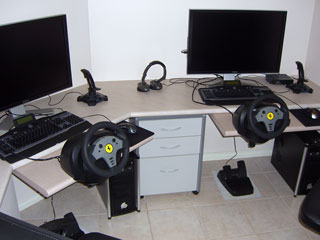
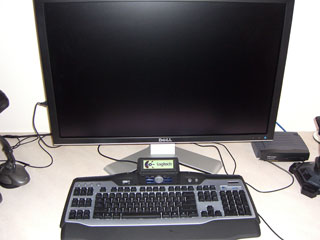
 660 Inch Monster Setup! We recently bought 2 (yes, two!) 30 inch monitors for our gaming setup. The choice for the Dell 3007WFP came down primarily to availability here in Australia but we also looked seriously at Apple’s 30in Cinema HD display. In this first look review we give you our findings after having used the Dells for about two months now.
What are the main pros and cons of the 3007WFP?
Let’s start with our initial conclusion:
That way you know where we’re heading with this review.
PRO:
- Huge display
- Ultra-high, 2,560 x 1,600 pixel resolution
- Very readable text, even with small fonts
- Good-looking design
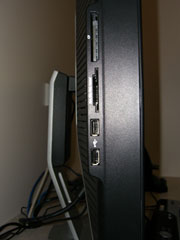
- Built-in media card and 4 USB slots
- Reasonable price (around the AUD2900 mark around USD2200)
CON:
- Requires dual-link DVI graphics card
- No composite or S-Video inputs
- No HDMI
|
|
|
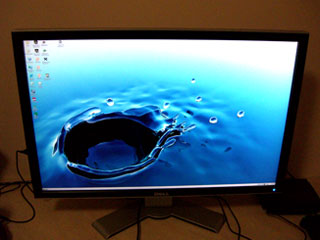
Big is best when it comes to screen real estate. That’s why years ago I bought a huge 19” CRT before they became affordable. That thing is still perfectly usable for some poor bugger who can’t afford an LCD monitor but if you want significant productivity boost or just the ultimate in gaming experience, we need to look at the really big screens. And 30 inch is about as big as they get in 2006. Sure, there are bigger plasma and LCD TVs but generally they are not hooked up to PCs and certainly they cannot get the superior resolution of 2,560 x 1600 of the Dell and Apple monitors.
The extra-sharp resolution comes at a price. First off, the purchase price puts it squarely in the niche market of high-end gaming or in application-specific areas. We can think of photo and video editing or any graphics intensive application such as CAD/CAM, 3D modelling or displaying huge amounts of data such as for the stock market. But even for more mundane tasks, such as program development or internet browsing the massive area comes in extremely handy. It helps too that the 3007WFP has an 11ms response time and 700:1 contrast ratio.
Color Accuracy:
Just have a close-up look at color accuracy in the two images below. The whites on the Samsung monitor are brighter and more “homogenous” compared to the pixels on the Dell which are more dissimilar. This results in the image being less white. This isn’t an issue in games and can even improve the visual texture but is not totally ideal for high-end graphics work where perfect accuracy is essential. We often found that high-resolution LCD panels have this problem. See for instance our recent review of the Metabox 730u Notebook with the extremely high 17″ resolution of 1920×1200. Keep in mind that these images are taken with a digital camera and may not be a 100% accurate representation of the difference but should still give a good idea of the result. Both resolutions were set to 1280 x 800 as this is the maximum for the Samsung 19″monitor used in the comparison.
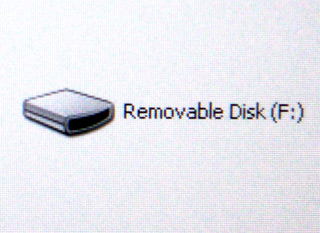 Dell UltraSharp 3007WFP 30” TFT LCD Monitor |
Samsung 19″ 970P TFT LCD Monitor |
We tested the 3007WFP primarily in the gaming area with the following software:
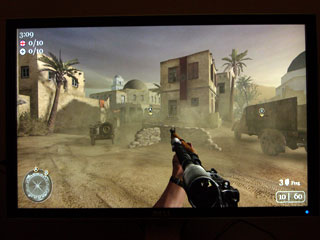
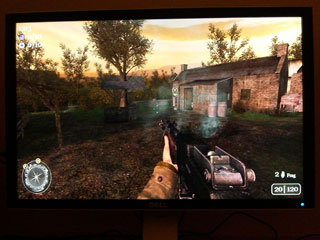
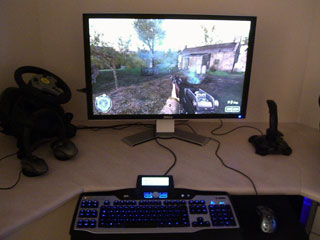
We’ve given you a few details on this setup and we’re pretty proud of it — and biased of course! We tested the panoramic qualities in game view on Call to Duty 2, V8 Super Cars and Battlefield 2. We found that the resolution was so good that it enabled you to put your face almost on the screen and when we say, in game view we mean really “in”, flying the jets in Battlefield 2 with your face up close made for an awesome experience for twisting your head from side to side as you fought to negotiate the fast exhilarating flight under bridges… The screen’s response time kept well and truly up with V8 Super Cars and once again the huge screens came to the fore allowing an almost 180 degree view with peripheral vision being able pick up the countryside flashing by, which put a lot more reality into the “in house” lifelike racing.
Keep in mind that not all games support a 2560×1600 resolution yet. However, even if you run your games at a lower resolution it will still be an awesome experience.
 |
|
System Requirements:
We mentioned before the need for a high-end graphics card that supports dual-link DVI cards. The main aim here is to double the bandwidth of the DVI interface, which drives the 4 megapixel display. The nVidia GeForce 7950GX2, 7900GTX 7900GT, 7800GTX and 7800GT has this interface already built in. Similarly with the X1900 graphics chips. Dell includes the dual-link DVI cable with the monitor.
Our gaming platform specs are as follows:
(mind you, everything is times two as these are two completely separate, duplicated systems)
Computer
ASUS A8N32-SLI Motherboard
AMD Athlon64 X2 4400+ Processor (Overclocked to 3.0GHz)
2GB PC4400 DDR Memory
500W PSU
Graphics
2x XFX 7900GTX 512MB Extreme Edition (690MHz Core, 1750MHz Memory) NVIDIA GeForce PCI-Express Graphics Card
Peripherals
Logitech G15 keyboard and MX518 Mouse
Logitech Attack 3 Joystick
ThrustMaster GT Force Feedback Steering Wheel
Elegance and Simplicity:
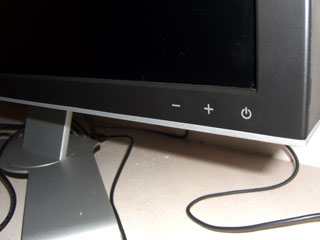
That’s what you find when you look at the front of the 3007WFP. Three buttons, flush with the bezel, grace the display in an unobtrusive way. There is no on-screen display but all settings are managed via the PC graphics card control panel. Dell has integrated this directly into nVidia’s advanced control panel and this is where you can change colour temperature, monitor scaling, brightness and contrast. Particularly the brightness you might want to adjust when doing normal desktop jobs even though I like a rather bright screen myself. The 4 USB and Media Card slots are located on the lower left corner of the display. When not in use you don’t notice them. However, when you have things sticking out of these ports it spoils the clean looks… I’d rather have these slots in the back of the panel or better still: in the base.
The 178 degree viewing angle is amazing. Every laptop should have that as it makes showing pictures or movies much more enjoyable for a group of people. Now, if you could also make that huge viewing angle adjustable for privacy reasons (like when on an airplane when you’re working on confidential company stuff) then we’ve got the best of both worlds!
|
|
|
Overall Impressions
Some early reports mention ghosting on black backgrounds. We have not found any evidence of that on our two monitors. It was always a bit of a concern – and almost an expectancy – to find dead pixels among the 8 million… (that’s for two screens of course!). You wouldn’t notice a dead pixel so much in gaming but you might in desktop use. However, Dell’s quality control did not let us down with these screens. Two of our friends also bought these Dells upon our recommendation and there was only one dead pixel among the 4 screens. Not bad. Readability of text can be an issue with that high resolution but under new Vista management that becomes an automatic thing. The new OS offers a compositing engine allowing typefaces to be displayed at the same size irrespective of monitor resolution.
|
|
|
Recommendations:
If you are simply after more real estate it is easier and cheaper just to buy two separate monitors but if you have a need and the funds, the Dell 3007WFP is an amazing display. Once you have played games on it which fully support the ultra sharp resolution you will never want to go back to any smaller monitors. Of course, in the gaming world you score extra by killing your opponent with jealousy and envy. As much as we like admiring glances, an early “Game Over” doesn’t work for us. We want to give our opponent a fair chance. That’s why we bought two of them…
For other recommendations check LCD Monitor.
Specifications Dell 3007WFP:
|
Manufacturers Rating |
|
|
Display size |
30-inches, diagonal |
|
Native resolution |
2560×1600 pixels |
|
Aspect ratio |
16:10 |
|
Pixel response time |
11ms |
|
Pixel response (full) |
14ms |
|
Pixel pitch |
0.250mm |
|
Viewing angle |
178 degrees (vertical and horizontal) |
|
Luminance |
400 cd/m2 |
|
Contrast ratio |
700:1 |
|
Monitor stand |
Tilt, swivel (does not rotate) |
|
VESA mounting support |
Yes |
|
Physical size (fully extended) |
22″ (H) x 27.26″ (W) x 7.87″ (D) |
|
Physical size (fully lowered) |
18.5″ (H) x 27.26 (W) x 7.87″ (D) |
|
Weight |
25 lbs. |